Pages

Saturday, 29 December 2012

How these types of images gets maximum likes in facebook

Nowadays, most of the Facebook users are simply cheating the readers to get more Facebook likes and shares for them. So I would like to notice you all about that. In this post, I will show you some examples and you will able to choose the fake one after reading this post.

Example 1

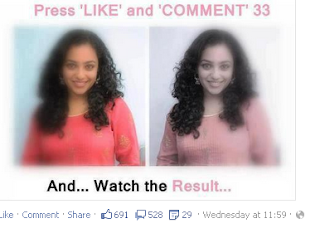
Press Like and Comment 33
Have you seen the results ? It got 691 likes and 528 comments and 29 shares. Is it an extra-ordinary image ? Exactly no. Because all people are liking that and commenting on that image because of the tag line used there " Press Like and Comment 33 ",  "And... Watch The Result.....". Will anything happen if you do that ? Nothing is going to happen if you like and comment 33 for that image. Only one thing will happen ! Their likes, shares, comment will increase a lot.

Example 2


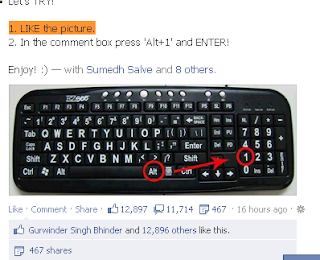
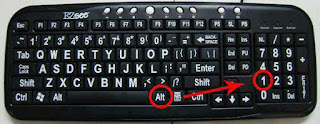
In this image also, all are using the same strategy. They are asking you to press Alt +1 as a comment and and to like the image. What will happen ? A special character will come as a comment. That is the result and nothing will happen. Their likes will and comments will get increased. At this time, it had received 12,897 likes, 11,174 comments, 467 shares yet. This is the result.

Example 3


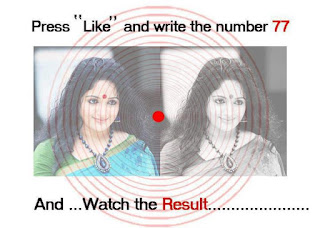
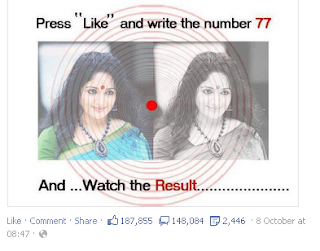
This is example 3. How is that ? Do you except there will be a change in the image if you like this image and comment on it ? The answer is no. But there are still those who didn't understand that. As a result,  they got 187,855 likes, 148,084 comments, 2,446 shares yet. 

Fact People Have to Remember 

A normal person cannot do anything by uploading a Facebook image. These are images for getting more likes and shares by cheating the common people. But we don't cheated by them. Is it ? So be aware of these types of images and don't like or comment them. If we all do like that, these series of cheating images will end. But they are not having fake likes or comments, they are having real things. But we have to understand that its just an image and nothing will happen to the image if we like him or comment on him.

Why Such Images Were Created ?

These images may be created for fun, for getting tons of likes and shares and so on. And also to fool people. But these types of images will always be floating in Facebook even after months. So these types of images have many uses. But this is not a good practice to get more Facebook likes and shares by fooling ordinary people. So those are uploading these images may have to stop these practice of fooling people.
This post has been created on public interest and for public awareness and not to harm

Saturday, 1 December 2012

vodafone 3g gprs hacked working 100%[NOT WORKING]

Just follow the few simple instructions if you want to use this trick :-
1. First download  ultra surf  [ Click Here ]

2.Now install the Ultrasurf

3.Run the ultra surf application.

4. After starting ultrasurf connect to intrenet using  Portalnmms apn in your PC.

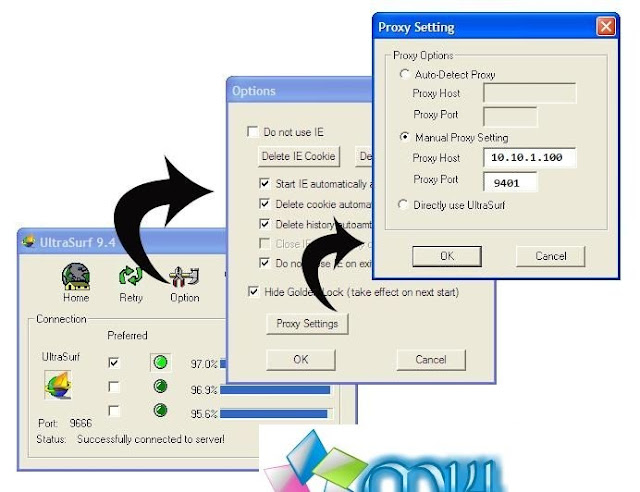
5. Now in the ultra surf go to Options > Proxy Settings.Select Manual Proxy Setting.

6. Now write Proxy Host as 10.10.1.100 and Proxy Port 9401 and click on OK.Refer Following screenshot for more details 


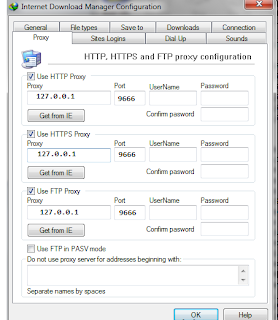
7. Now configure Internet download manager as proxy 127.0.0.1 and Port as 9666.

How to Setup Proxy and Port in IDM?

1. Open your internet download manger
2. click on Downloads in Menu-bar And go to Option

3. Then Proxy/Socks Tab From it.

4. Now Mark the check box Saying Use Proxy

5. Now Add Proxy Address and port also mark the check box below it saying ” Use This Proxy For Following Protocols”
and Mark all check box below it of  HTTP,HTTPS and FTP

6. Click on OK

7. Done

Thursday, 16 August 2012

FACEBOOK AUTO LIKES

Now Follow the steps
Step 1:
Go to your privacy Settings and change your Privacy Settings To Everyone.
Step 2:
Go here https://www.facebook.com/about/subscribe And Allow Suscribers
Step 3:
Go here to Get Token Now copy that Url starting from access_token= After that copy all string upto &expires_in=0
Step 4 :- Now Open http://likehoot.com/ and on field enter that token id that u copied and paste and enter now you will be asked to enter the cmment or status id.
Step 5:- to get facebook comment , post one status now click on time you will see /post3/3252352352
step 6:- Now paste 3252352352 to that Box and now wait and watch in seconds you will get Likes above 40000+
Enjoy

Huge Collection of sites to perform auto like Trick in facebook
http://www.likehoot.com/
http://megaliker.tk/
http://fb-autoliker.com/
http://www.powerlike.net/
http://www.ninetysevenxz.net/AutoLike-MY
http://www.zonedevil.org/AutoLiker/
http://www.moleckcyber.com/
http://www.autolike.org/
http://root.hackz.name/
http://fb-autolikes.webs.com/
http://an-ion.xtgem.com/Menu/autosuka
http://www.postliker.co.cc/
http://g.endut.net/
http://testajerkk.site88.net/
http://dimana.blogku.biz/
http://ninetysevenxz.net/
http://expert-free.net/
http://extreme-likers.tk/
http://likextreme.com/
http://autolikephc.co.cc/
http://awesomelike.webuda.com/ Password: hancegwapo.com
http://likeabugger.weebly.com/
http://oyeahlike.weebly.com/
http://wendellocampo.weebly.com/
http://like.vipfree.us/
http://dimana.blogku.biz/
http://megaliker.tk/
http://diputus.in/
http://www.ninetysevenxz.net/AutoLike-MY
http://www.moleckcyber.com/
http://www.autolike.id.web.id/
http://autolikebot.net/
http://e-zonal.com/like.php
http://CyberZombie.Tk/

Saturday, 4 August 2012

speedly turn-ON or OFF your computer

Compatible OS: Windows
Development Platform: Python

Description: A Small Tool to quickly, shutdown, restart and delay shutdown A Computer

Installation: It Has A Self Installer, Any time to uninstall, You can uninstall from Control Panel, Or Use The Self-Uninstaller.

Download Link: Click Here


Sunday, 1 July 2012

Hide or unhide ur drives

How to Hide Drives Using Command Prompt(cmd) in window 7,Xp,Vista

If you have sensitive or important data stored on a particular disk drive that you don’t want anyone to see, a great way to hide it is to remove the drive letter assigned to a particular mounted volume. With Windows XP, you can achieve this easily using nothing more than the Command Prompt. Here's how:

    Click Start -> Run (This brings up the Run dialog box)
    Type cmd and press Enter (This brings up the Windows Command Prompt
    Type diskpart in the command prompt and press Enter (This launches the Diskpart utility within the Command Prompt window)
    Now type list volume (This displays a list of all mounted volumes on your computer and their associated drive letters)


    Using the above picture as reference, if, for example, you would like to hide drive R

    Type select volume 1 (or select any other volume as where the drive is present)
    Now type remove letter R (Note: This sometime requires a reboot)


Diskpart will now remove the drive letter.

The drive will no longer be available via Windows Explorer or My Computer.

Don’t worry though, your data remains safe!


Unhide

Now, should you want to unhide the drive and make it accessible again, just repeat the above process. But instead of typing remove letter R, type assign letter R

    Click Start -> Run (This brings up the Run dialog box)
    Type cmd and press Enter (This brings up the Windows Command Prompt
    Type diskpart in the command prompt and press Enter (This launches the Diskpart utility within the Command Prompt window)
    Now type list volume (This displays a list of all mounted volumes on your computer and their associated drive letters)
    Type select volume 1 (or select any other volume as where the drive was present)
    Now type assign letter R (Note: This sometime requires a reboot)


    The drive will be available via Windows Explorer or My Computer